4.20.2009

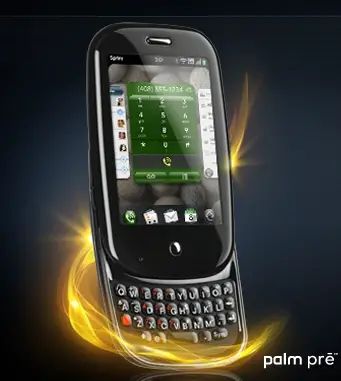
Can the Palm Pre work in the classroom?


I was checking my email last Friday and was excited to see the an email from Sprint about the new Palm Pre. If you have been following the buzz about this phone, you already know how gadget geeks have been salivating over this upcoming smartphone since it was unveiled at CES earlier this year. I admit, that I, too, have been drooling over pics at the official Sprint site.

All of this started me thinking: if - and that is a big IF -I were to plunk down the money for this phone (as of now, Sprint has not announced a price yet), I would need it to function for my personal life and in the classroom.

Personal use of the Palm Pre looks pretty sweet. It looks like my dream phone -- one that can sync information into the cloud. Like many, I am a heavy user of Gmail, Google Calendar, Reader, etc. What bugged me about my Centro is that there is no way to sync my Google calendar or Gmail contacts with my Palm software (without paying hefty subscription fees. Boo Goosync!) But the Pre will be able to sync wirelessly and intuitively to my cloud information. At least that is what I am hoping... And all this with (finally!?) updated multi-touch hardware and software that can is worthy to be put in the same category of the iPhone. I even downloaded an WebOs emulator, but it has been removed from the site. It works pretty well though and wetted my appetite for the Pre even more...

The Pre may be up to the classroom challenge as well; but we will have to see what applications will become available through the Sprint/Palm WebOs application store. In the past, the Palm platform has had quite a few programs that worked well in the classroom environment: Quiz Buddy, Inspiration, grading scales, outliner applications, just to name a few. But is it worth it to use a smartphone in the classroom instead?

Then I came across the following post from the Learning is Change Blog about "Strategies for Mobile Devices in the Classroom." Very interesting links including a blog solely dedicated to using cell phones in the classroom. But what really caught my eye were the sites TextMarks (even if you just used it to post school closings or emergencies would be great) and TextTheMob (which would work fantastic if you have a Smartboard!) Very cool stuff. Has anybody used these sites in the classroom? Has anybody used cellphones with K-2 students in the classroom?

http://learningischange.com/2009/04/16/strategy-for-mobile-devices

3.12.2009

Link Love: SMART Boards and a Simple Number Line Tool

Great resource from James Hollis.  Interactive number line tool to use with the Smartboard.  Great for Everyday Math lessons.

Teachers Love SMART Boards: SMART Boards and a Simple Number Line Tool

http://smartboards.typepad.com/smartboard/2009/03/smart-boards-and-a-simple-number-line-tool.html

3.05.2009

Link love: Inspired Classrooms » home

What a great idea!  Found this site via Learning is Change (great blog).  Inspired classrooms is about finding the middle ground between having computers in the classrooms but not yet having a 1:1 computer situation.  Simply by placing a few computers in an accessible manner where students can access them regularly can cause a huge shift in instruction.  Make sure you check out the videos on the philosophy behind Inspired Classrooms -- good stuff, especially for elementary classrooms. When I return from maternity leave, I can't wait to try to implement this!

http://inspiredclassrooms.wikispaces.com

3.03.2009

Link Love: Ideas to Inspire


Posted from Diigo. The rest of my favorite links are here.

Why I haven't blogged in 6 months


While I've been actively reading other edutech blogs this school year, I have not posted much. That is because in June 2008, I found out that I was pregnant. And on Monday, February 9th at 6:07 AM, my husband and I welcomed our first child, Charlie Star, into the world. Charlie is named after my maternal grandfather who passed when I was young. My husband picked her middle name. She is my heart! Although, I'm suffering from a bit of sleep deprivation, we are all doing well. Of course, Charlie has totally changed my outlook and schedule (I'm stealing time now while she is sleep to post this.) But I would not change this experience for anything. Hopefully, as things settle down, and I get back to work, I can rejoin this digital conversation.

What type of blogger are you?

Just heard about this neat site called Typelyzer via the Cool Cat Teacher Blog that will analyze your blog writing style and theorize your personality traits. Here's what it said about me:

The analysis indicates that the author of http://thehappyhappyapple.blogspot.com/ is of the type:

ESTP - The Doers

The active and playful type. They are especially attuned to people and things around them and often full of energy, talking, joking and engaging in physical out-door activities.

The Doers are happiest with action-filled work which craves their full attention and focus. They might be very impulsive and more keen on starting something new than following it through. They might have a problem with sitting still or remaining inactive for any period of time.


While not totally accurate, this analysis does hit pretty close to home. I think I'm more of a creative-type than an active outdoorsy-type. But the "impulsive, starting something new" description was dead on.

The other good thing about this post was that I found out about another blog, The ETLMS Blog which is sponsored by Oakland Schools -- my district! I don't know how long Oakland Schools has been offering the option of starting a blog on their site, but I think it's a fantastic way to keep the dialogue about educational technology open -- especially at home. And I can't wait to explore the other blogs on the site. Thank you Cool Cat!

Typealyzer

8.29.2008

VIDEO: Do You Believe In Me?

Just saw this post on James Hollis' blog. Had me in tears... What a great way to start the school year.